Announcements

  1. Release notes: Treasury report per location

    You can now see your loyalty balance per location in one report. For each location, the treasury report shows the loyalty value built up through transactions (In), the value of coupons redeemed there (Out), and the net balance. This makes it easier to settle loyalty costs across your location network.

    To use it, mark the coupons you want included with the new Include in treasury report toggle, and give them a monetary Value on the coupon detail page. The report is available through your automated exports. Contact your NeoDay implementation manager to get it set up.

    Add a comment

    Comments

  2. Release notes: Manage customer coupons from the backoffice

    Your support team can now view and manage a customer's coupons directly from their profile in the backoffice. Open the customer's profile and go to Coupons to see all their coupons, including status, code and expiration date.

    From there you can:

    • Grant a coupon, either for the customer to claim themselves or ready to use straight away. This is useful for complaints, goodwill gestures or rewards that went missing.
    • Delete a coupon from the customer's account.
    • Restore a deleted coupon, including one the customer removed by accident, as long as it's still valid.
    • Coupons are now also revoked automatically when a customer cancels their order and requests a refund. No manual cleanup is needed.

    Customer coupon questions can now be resolved on the spot, without a support ticket to NeoDay.

    Add a comment

    Comments

  3. Release notes: Automate loyalty currency changes

    Campaigns can now pause, check a customer's points balance and adjust it automatically. Three new actions in the campaign action tree let you build time-sensitive loyalty flows that reward the right customers at the right moment, without manual follow-up.

    The new actions are Wait, Check points balance and Adjust points. They are available in every campaign and can be combined freely with existing actions such as Reward coupon.

    Untitled

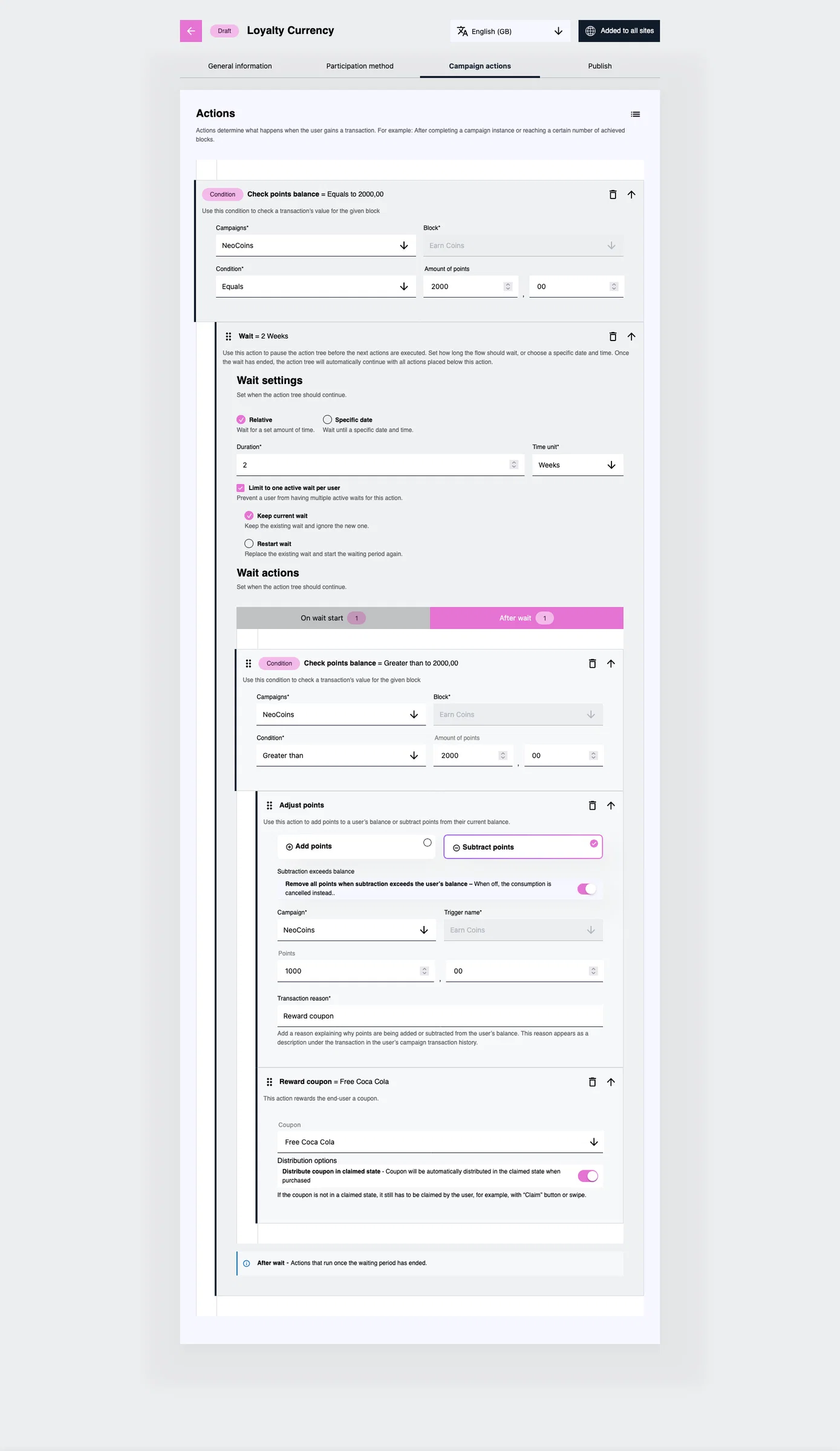
    Example flow in the Campaign actions tab: customers who reach 2,000 NeoCoins and still have more than 2,000 two weeks later trade 1,000 coins for a free Coca Cola coupon.

    New features

    Wait

    Pause the action tree and continue automatically once the wait ends. Everything placed under the Wait runs without manual intervention.

    • Relative: wait a set duration in minutes, hours, days or weeks.
    • Specific date: wait until a chosen date and time.
    • Limit to one active wait per user: stop a customer from stacking multiple waits on the same action. Choose Keep current wait to ignore new triggers, or Restart wait to start the waiting period again. Leave it off to allow parallel waits.
    • Wait actions: place actions under On wait start (run immediately, for example a "your reward is on its way" message) or After wait (run once the period ends).

    Check points balance

    Branch the flow on a customer's current loyalty currency balance. The balance is read live at the moment the condition runs, not from a cached value.

    • Select the campaign; the linked block is filled in automatically.
    • Choose an operator: equals, not equals, greater than, greater than or equal to, less than, or less than or equal to.
    • Enter the amount of points, including decimals.
    • Actions nested under the condition only run when it is met.

    Adjust points

    Add points to or subtract points from a customer's balance as part of the flow.

    • Choose Add points or Subtract points, then select the campaign and enter the amount.
    • Transaction reason is required and appears under the transaction in the customer's campaign transaction history.
    • Subtraction exceeds balance: when on, all remaining points are removed if the subtraction is larger than the balance. When off, the subtraction is cancelled.
    • Every adjustment is logged in the transaction and consumption records with a reference to the campaign that made it, giving a full audit trail.

    Example: reward customers who hold on to their coinsThe flow in the screenshot turns 1,000 NeoCoins into a free drink for customers who keep a healthy balance.

    1. Check points balance — the customer's NeoCoins balance equals 2,000.
    2. Wait — 2 weeks, limited to one active wait per customer (keep current wait).
    3. Check points balance (after wait) — the balance is still greater than 2,000.
    4. Adjust points — subtract 1,000 NeoCoins with the reason "Reward coupon".
    5. Reward coupon — issue a Free Coca Cola coupon, distributed in claimed state so the customer doesn't have to claim it.

    Customers who spent their coins during the two weeks drop out at step 3 and nothing is deducted.

    Good to know

    • Find the new actions in the action library on the Campaign actions tab of any campaign.
    • If a campaign fires on every transaction, turn on Limit to one active wait per user. Otherwise a customer above the threshold starts a new wait with each purchase.
    • Adjust points changes balances directly, outside the normal earn and spend flow. Test the flow on a draft campaign before publishing.
    Add a comment

    Comments

  4. Seamless access to your linked web experiences — no second login

    Improvement

    We've added a new authenticated webview link type that lets you send users straight to an external web page (a webshop, portal, or partner site) without asking them to sign in again.

    When a user opens one of these links, we hand off their session securely in the background using a short-lived token, so they land already logged in. External access stays locked to authorized users only — no session sharing, no token leaks.

    What you can do with it:

    • Point any deep link to an external, authenticated web experience — configurable across navigation, banners, user settings, the user panel, and customer cards
    • Choose how logged-out users are handled: open a login prompt, or let them browse in a logged-out state
    • Works consistently across app (iOS & Android) and client-web

    The result: a smoother journey between your app and the web destinations you connect to it, with security handled automatically behind the scenes.

    Add a comment

    Comments

  5. Hello World! We're Using Frill 🚀

    New Feature
    Announcement

    Frill is a place where you can submit feature requests, view our Roadmap, and keep track of Announcements.

    With Announcements, you can add images like below...

    frill 1

    ...and reference the original idea by adding it using the 'plus' button on the left.

    Oh, and make sure you set up your widget right here.

    If you have any questions, check out our help docs here.

    Add a comment

    5

    Comments